In Lesson 2, we organized the project files into folders; now, we are structuring the scene itself into branches. We are building a tree structure where the departments will later place the entire shot.
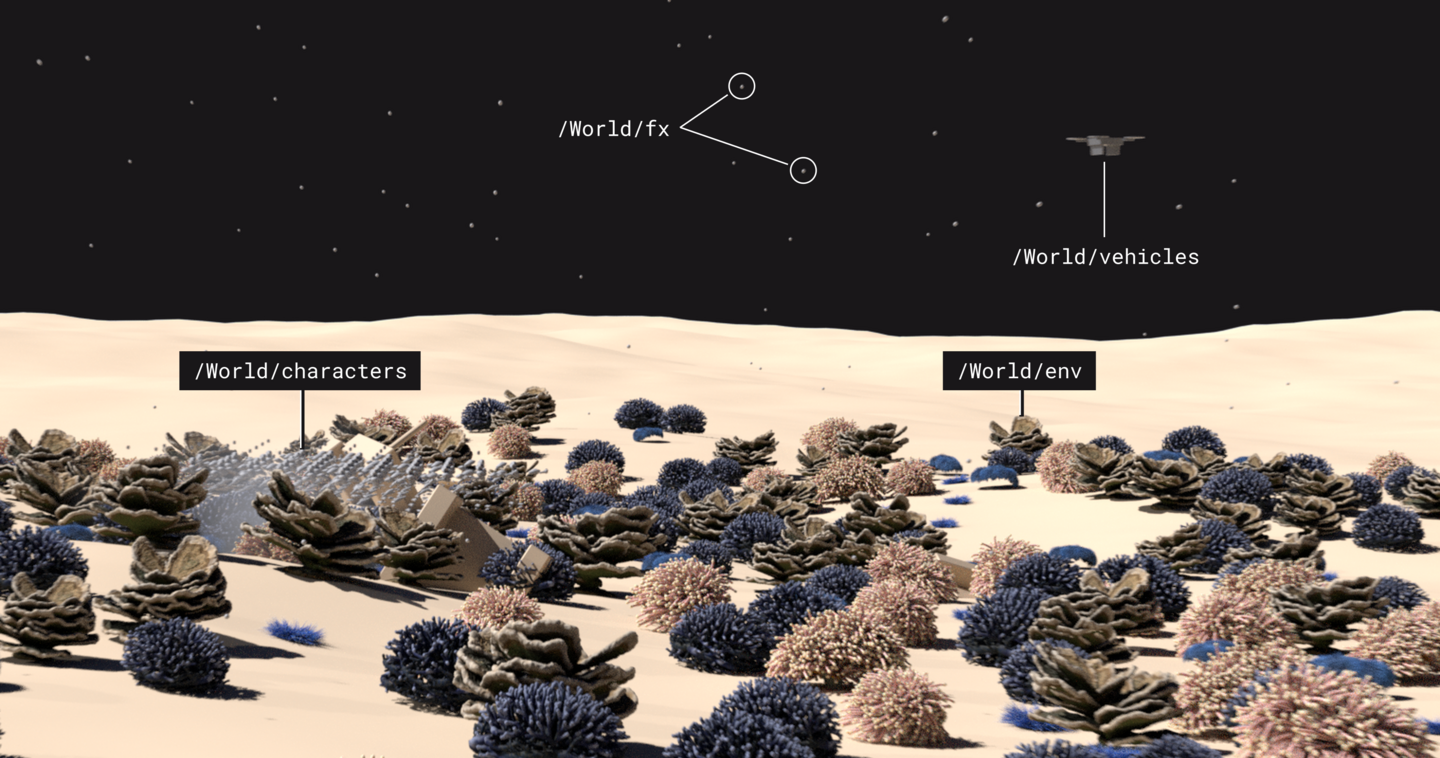
The scene tree is for the entire project. Each object resides in its own branch, and each branch has an owner.
1. Skeleton, kind, and purpose
If one coral is located at /World/Corals and another at /Geometry, editing along a single path will not find them in the other location. Therefore, we determine the branch structure beforehand.
The root tree of a scene is called a scenographer, which is displayed by the Scene Graph Tree. An empty branch structure common to all scenes in the project is called a scaffold.
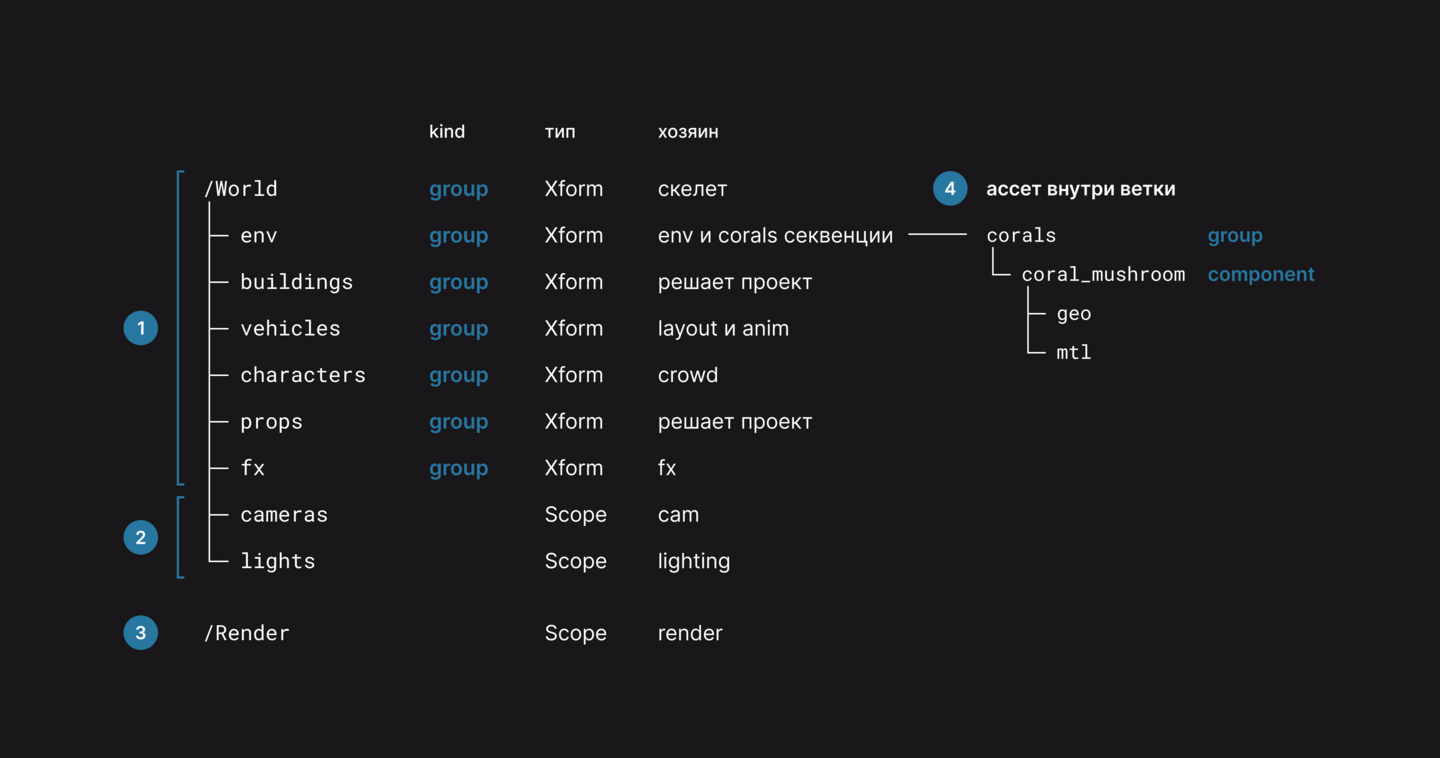
On the diagram, the branch owner is the person who writes into it.
1. At the top is /World and six branches for assets.
2. Cameras and lights are placed in /cameras and /lights.
3. The second root, /Render, is for render settings; we will populate it in Lesson 8.
4. Assets are placed inside their own branches; corals reside in /World/env/corals.
Five corals were placed in the skeleton; the kind is indicated by the icon next to the line.
1. Three stars signify a group, meaning «objects reside here.»
2. A blue star indicates a component—this is the coral itself.
3. Geo and mtl kinds do not have one.
A group on all branches above the asset up to /World is called a model chain. As long as it is intact, USD considers the asset a complete object.
In geo, coral_mushroom has two meshes, rendering at 25,629 points and proxying at 1,148. The viewport displays a light proxy, while Karma renders the full render.
For who needs the primitive, they check its purpose. A primitive with a render is only needed by the renderer; for the viewport, the proxy suffices.
2. Node Setup
The skeleton assembles the scene $JOB/pipeline/activities/scaffold//scaffold_v001.hip, with the entire network in /stage.
1. The Primitive creates /World.
2. A second Primitive creates branches for assets.
3. A third creates cameras, lights, and /Render.
4. The Scene Doctor verifies the kind.
5. The USD ROP writes the skeleton file.
Primitive creates instances along paths.
1. In Primitive Paths, you can specify multiple paths separated by a space.
2. Set the Primitive Kind to Group; the default is None.
3. In the third node, keep the Primitive Kind as None, but change the Primitive Type to Scope.
The type of the primitive tells you what it is. Xform moves along with everything inside it, whereas Scope is a folder that cannot be moved.
The Scene Doctor checks the scene before recording. It has nothing to catch in an empty skeleton; we will put a similar asset into the scene in Lesson 4.
1. In Kind, we check the box for Error.
2. We leave the adjacent menu set to Alert Only. The Fix Silently node silently corrects the kind, and the fault remains invisible.
3. We also enable Child Gprims; it catches extra primitives inside the mesh.
With this error, the scene will crash before it reaches the file.
USD ROP writes a skeleton.
1. In the Output File, we write $JOB/pipeline/templates/scaffold/v001/scaffold_v001.usda.
2. Under Layer Metadata › Default Primitive, we write /World.
3. We disable «Save ROP’s Time Information to Output»; the shot sets the frames.
The Default Primitive writes to the defaultPrim file—the main primitive of the file. The reference takes the primitive link without the path; this is Lesson 6.
3. Review
Breaking the chain in the coral_check_v002.hip lesson project scene. Configure Primitive fixes the existing primitive.
1. In Primitives, we type /World/env/corals.
2. We check the Kind box and select None.
3. We set the display flag to Scene Doctor. A red icon lights up next to it, and the node incorrectly reports an error for every coral.
A branch without a group means the asset is no longer a model.
4. Practical Assignment
Task: Assemble the skeleton of your project and record it in $JOB/pipeline/templates/scaffold/v001/. Include all lesson branches; you may add your own. Compile a table of branch owners.
Deliverables: The working scene, scaffold_v001.usda, and the table.
Accepted if
1. The skeleton opens in a new scene with one SubLayer, and defaultPrim points to World.
2. /World and six asset branches have the kind group attribute.
3. cameras, lights, and /Render have the Scope type, and /Render is located next to /World.
4. Before the USD ROP, Scene Doctor, Kind, and Child Gprims are set to Error and Alert Only.
5. Every branch has an owner listed in the table.
The skeleton is ready; each branch has an owner. Next, we create the first asset—the coral—and place it in its corresponding branch.