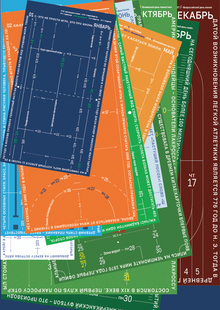
Екатерина Солопихина создала календарь "Спортивные поля", который представляет 12 уникальных спортивных полей. Каждый вид спорта в календаре имеет свою геометрию, отражающую особенности игры и атмосферу состязаний.
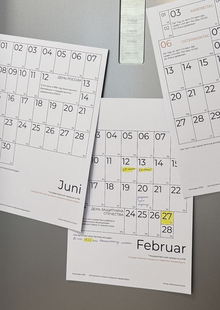
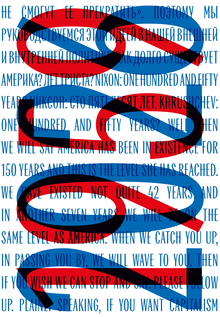
Полина Портареско создала билингвальный календарь-спесимен шрифта CoFo Glassier, состоящий из 24 плакатов. Проект посвящён Американской выставке в Сокольниках и Советской выставке в Нью-Йорке 1959 года.
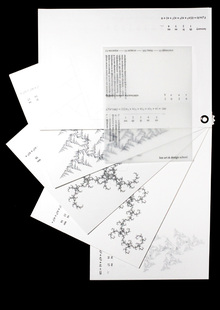
Владислава Семёнова создала фрактальный календарь ((20)26), в котором время представлено как множество форм и состояний. Проект визуализирует динамику фрактальных узоров, меняющихся и вращающихся на 360 градусов в потоке времени.
pro.hsedesign
Digital platform for creating presentations. An innovative online constructor where everyone can showcase their projects, proposals or educational courses in spectacular way.
We use cookies to improve the operation of the HSE website and to enhance its usability. More detailed information on the use of cookies can be fou...
Show more
Press space bar to start a drag.
When dragging you can use the arrow keys to move the item around and escape to cancel.
Some screen readers may require you to be in focus mode or to use your pass through key
Press space bar to start a drag.
When dragging you can use the arrow keys to move the item around and escape to cancel.
Some screen readers may require you to be in focus mode or to use your pass through key
Press space bar to start a drag.
When dragging you can use the arrow keys to move the item around and escape to cancel.
Some screen readers may require you to be in focus mode or to use your pass through key
Press space bar to start a drag.
When dragging you can use the arrow keys to move the item around and escape to cancel.
Some screen readers may require you to be in focus mode or to use your pass through key
Press space bar to start a drag.
When dragging you can use the arrow keys to move the item around and escape to cancel.
Some screen readers may require you to be in focus mode or to use your pass through key
Press space bar to start a drag.
When dragging you can use the arrow keys to move the item around and escape to cancel.
Some screen readers may require you to be in focus mode or to use your pass through key