- НОРМАТИВНАЯ БАЗА
- ОСНОВНЫЕ ХАРАКТЕРИСТИКИ СВЕТА
- ОСОБЕННОСТИ СВЕТОВОСПРИЯТИЯ
- НОРМИРУЕМЫЕ УРОВНИ ОСВЕЩЕННОСТИ
- БИОЛОГИЧЕСКИ ЭФФЕКТИВНОЕ ОСВЕЩЕНИЕ
- ЦВЕТОВАЯ ТЕМПЕРАТУРА
- ЦВЕТОПЕРЕДАЧА, ИНДЕКС ЦВЕТОПЕРЕДАЧИ
- ОБОБЩЕННЫЙ ПОКАЗАТЕЛЬ ДИСКОМФОРТА UGR
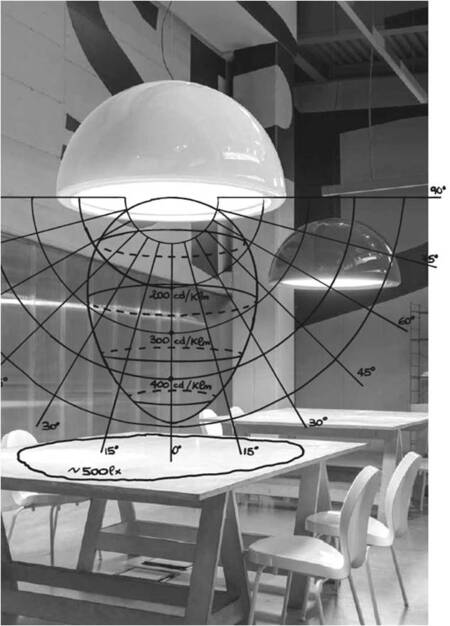
- ДИАГРАММЫ РАСПРЕДЕЛЕНИЯ СВЕТА
- УГОЛ ОСВЕЩЕНИЯ
- ВЕРТИКАЛЬНАЯ ОСВЕЩЕННОСТЬ, АКЦЕНТНОЕ
ОСВЕЩЕНИЕ, ИНТЕРФЕРЕНЦИЯ СВЕТА, ГОБО-ТРАФАРЕТ ОСВЕЩЕНИЯ
- ТИПЫ ОСВЕЩЕНИЯ: АРХИТЕКТУРНОЕ,
ЛОКАЛЬНОЕ, ДЕКОРАТИВНОЕ, ВИДЫ ФУНКЦИОНАЛЬНОГО ОСВЕЩЕНИЯ
- СТЕПЕНЬ ЗАЩИТЫ СВЕТИЛЬНИКОВ IP
- ОСНОВНЫЕ ИСТОЧНИКИ СВЕТА
- ПРИМЕРЫ СВЕТОВОГО ДИЗАЙНА. СВЕТ И ПРОСТРАНСТВО
- ОСНОВНЫЕ ПРОИЗВОДИТЕЛИ ОСВЕЩЕНИЯ
- ЗАКЛЮЧЕНИЕ: ПАМЯТКА РАБОТЫ НАД СВЕТОДИЗАЙНОМ ПРОСТРАНСТВА
ОСНОВНЫЕ НОРМАТИВЫ
- СП 52.13330.2011 Естественное и искусственное освещение. Актуализированная редакция
СНиП 23-05-95*
- МГСН 2.06-99 МОСКОВСКИЕ ГОРОДСКИЕ СТРОИТЕЛЬНЫЕ НОРМЫ ЕСТЕСТВЕННОЕ, ИСКУССТВЕННОЕ И СОВМЕЩЕННОЕ ОСВЕЩЕНИЕ
- СанПиН 2.2.½.1.1.1278-03 Гигиенические требования к естественному, искусственному и совмещенному освещению жилых и общественных зданий
- ГОСТ Р 55710-2013 Освещение рабочих мест внутри зданий. Нормы и методы измерений
- СП 367.1325800.2017 Здания жилые и общественные. Правила проектирования естественного и совмещенного освещения
- СанПиН 2.4.2.2821-10 Санитарно-эпидемиологические требования к условиям и организации обучения в общеобразовательных учреждениях
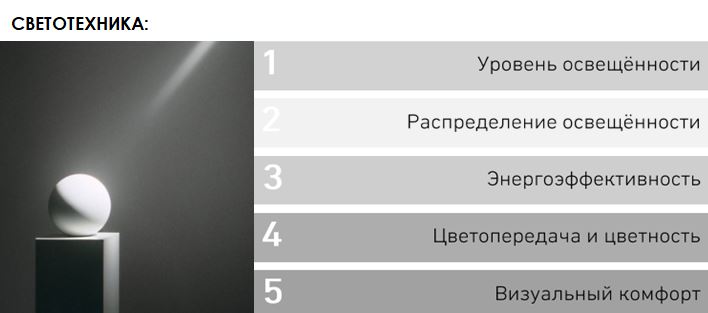
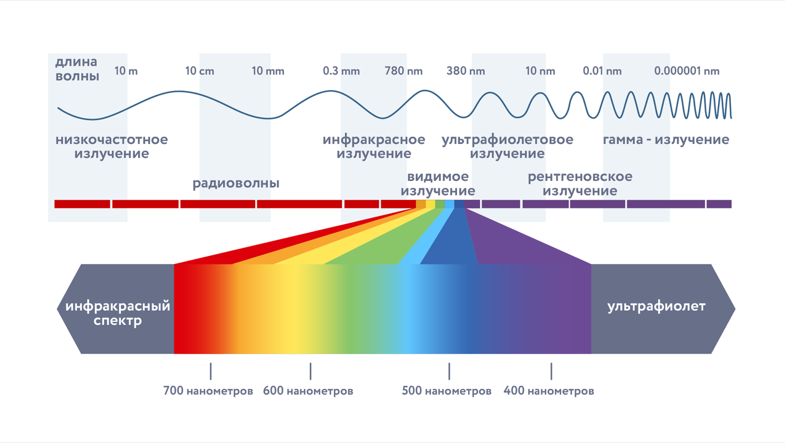
СВЕТ –электромагнитное излучение, воспринимаемое человеческим глазом
Original size 785x443
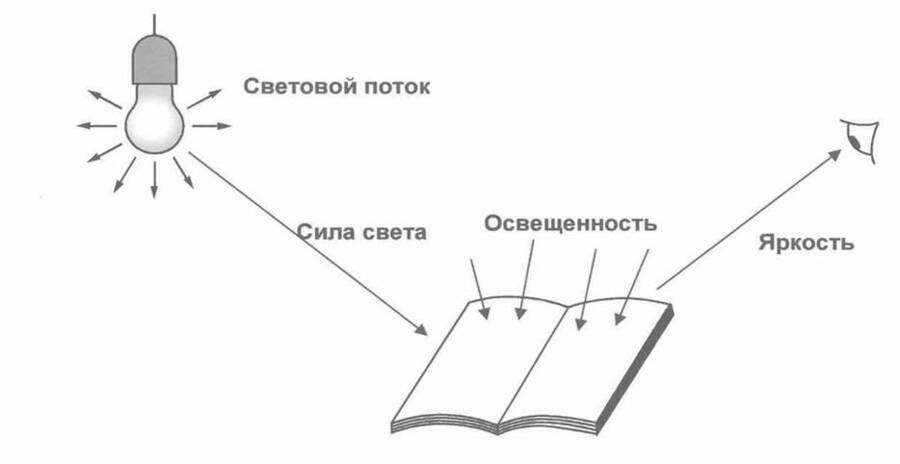
ОСНОВНЫЕ ХАРАКТЕРИСТИКИ СВЕТА
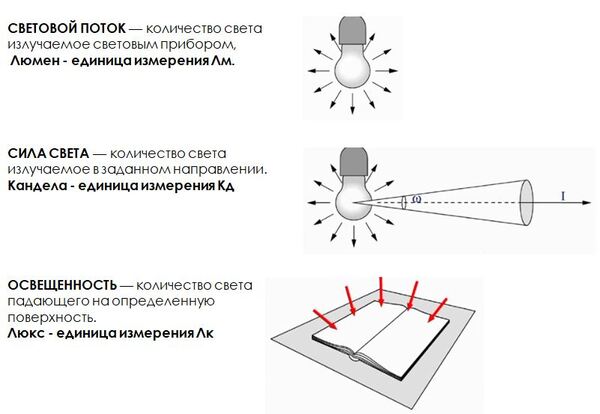
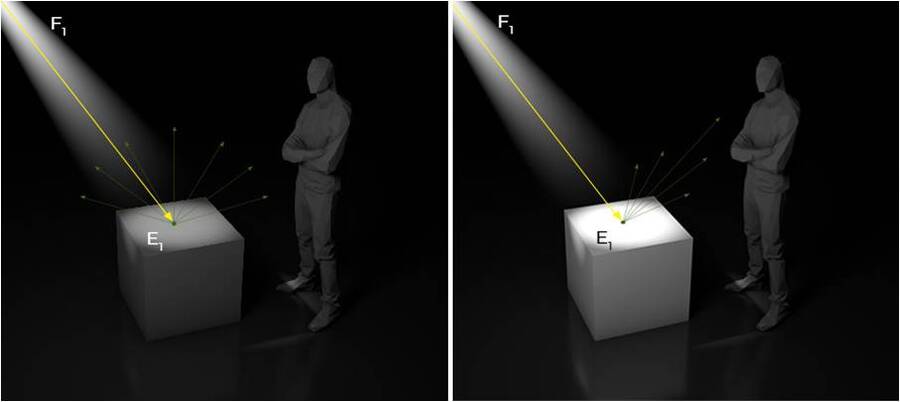
ЯРКОСТЬ-количество света излучаемое с видимой поверхности в заданном направлении.
Кандела/м2 — единица измерения яркости — кд/м2.
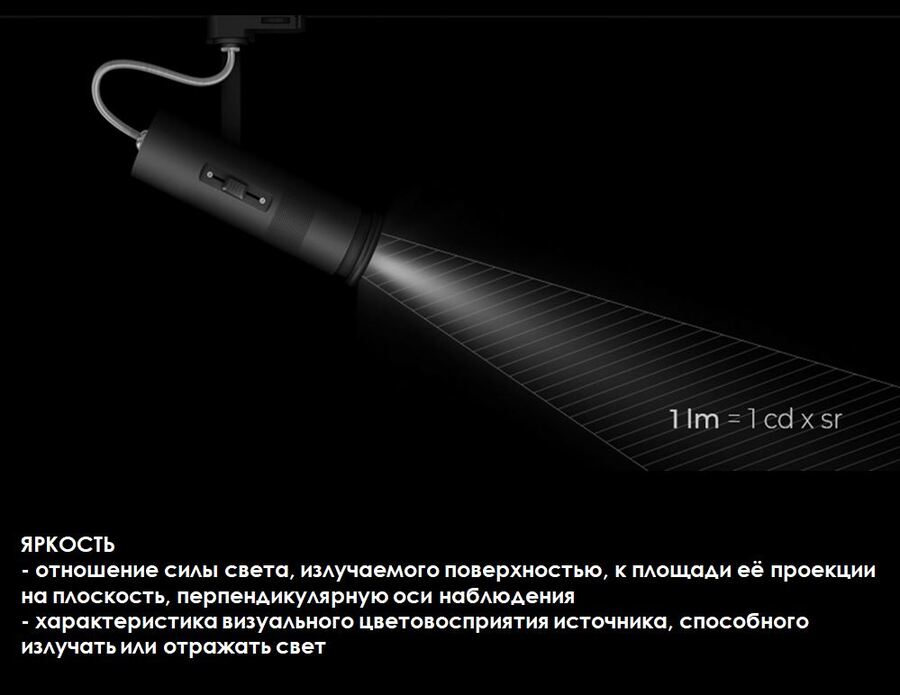
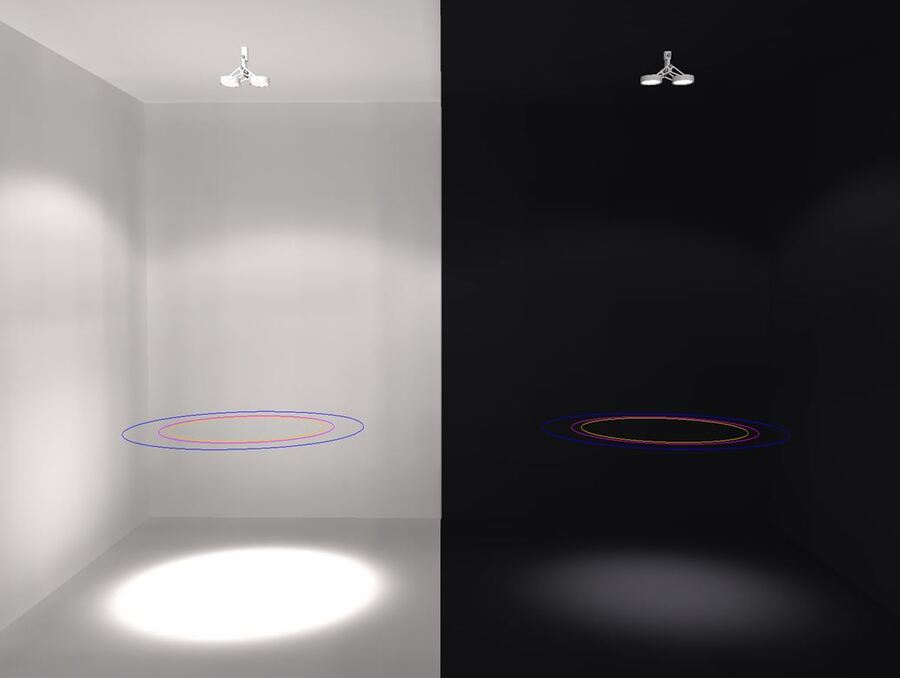
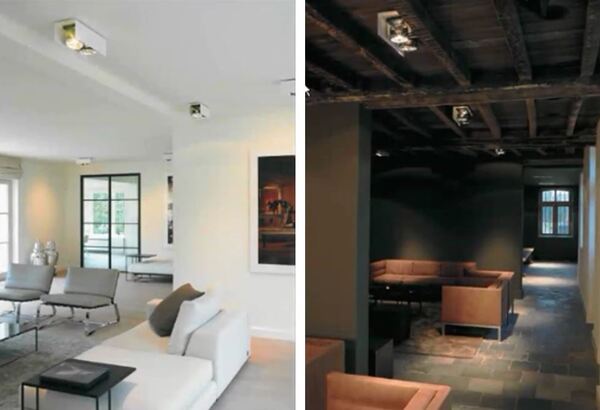
Поверхности с разными свойствами отражения при одинаковой освещенности имеют разную степень яркости
Original size 809x286
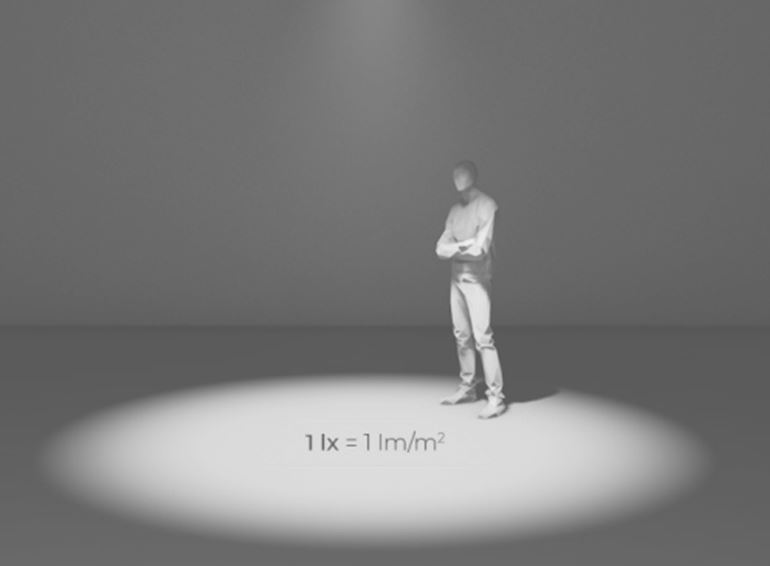
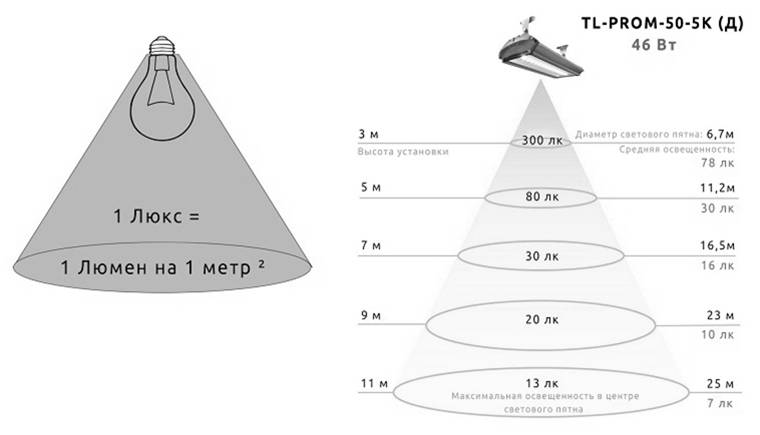
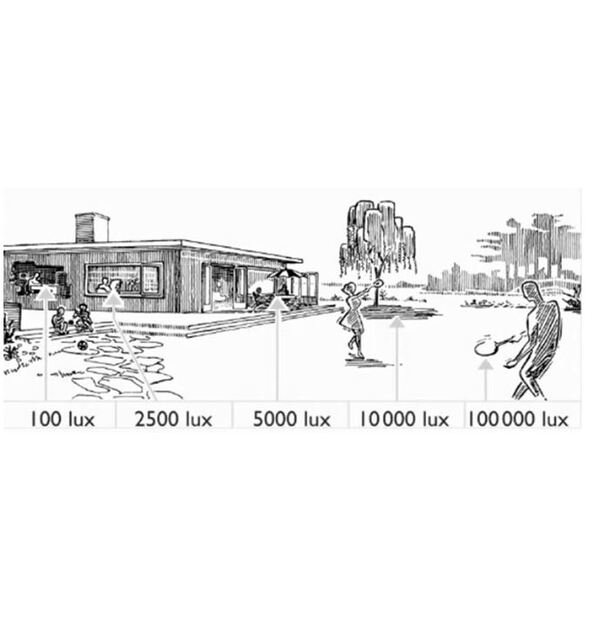
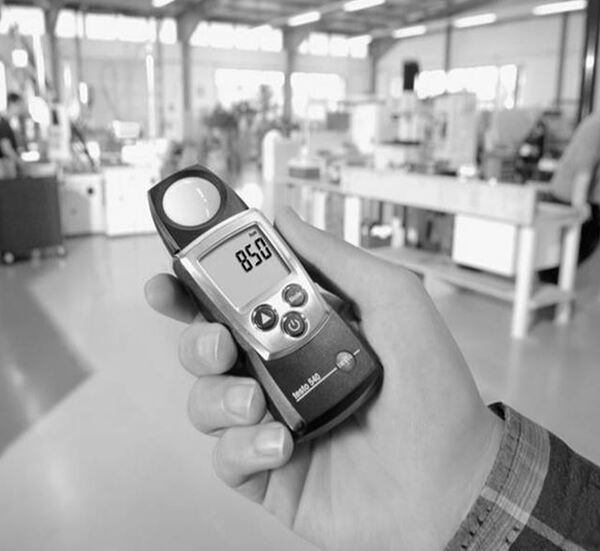
ОСВЕЩЕННОСТЬ — количество света падающего на определенную поверхность.
Люкс — единица измерения Лк
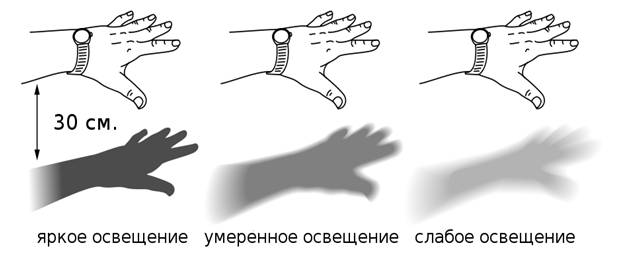
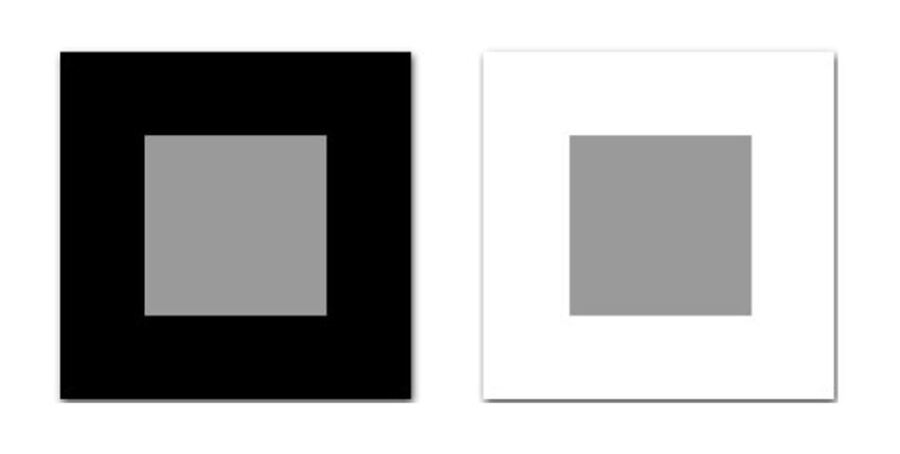
КОНТРАСТНОСТЬ ОСВЕЩЕНИЯ — разница в освещенности двух точек, которые мы чаще наблюдаем одновременно.
Original size 982x452
КОЭФФИЦИЕНТЫ ПРОПУСКАНИЯ, ПРЕЛОМЛЕНИЯ, ОТРАЖЕНИЯ
Original size 982x548
Коэффициенты относятся как к материалам и поверхностям, так и к самим светильникам.
Свет, проходя через оптическую систему и преломляется, и отражается, и поглощается.
Именно поэтому правильно писать — уровень светового потока от светильника, а не от источника света, так как значительная его часть теряется на оптике светильника.
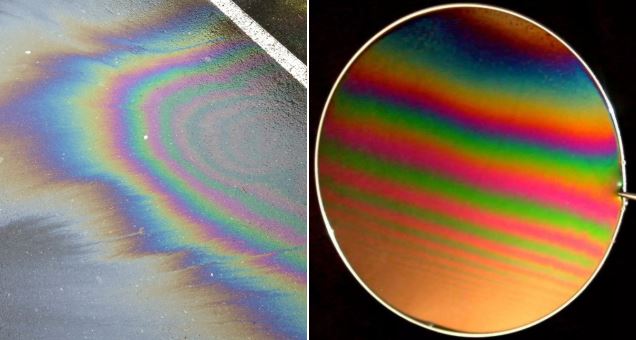
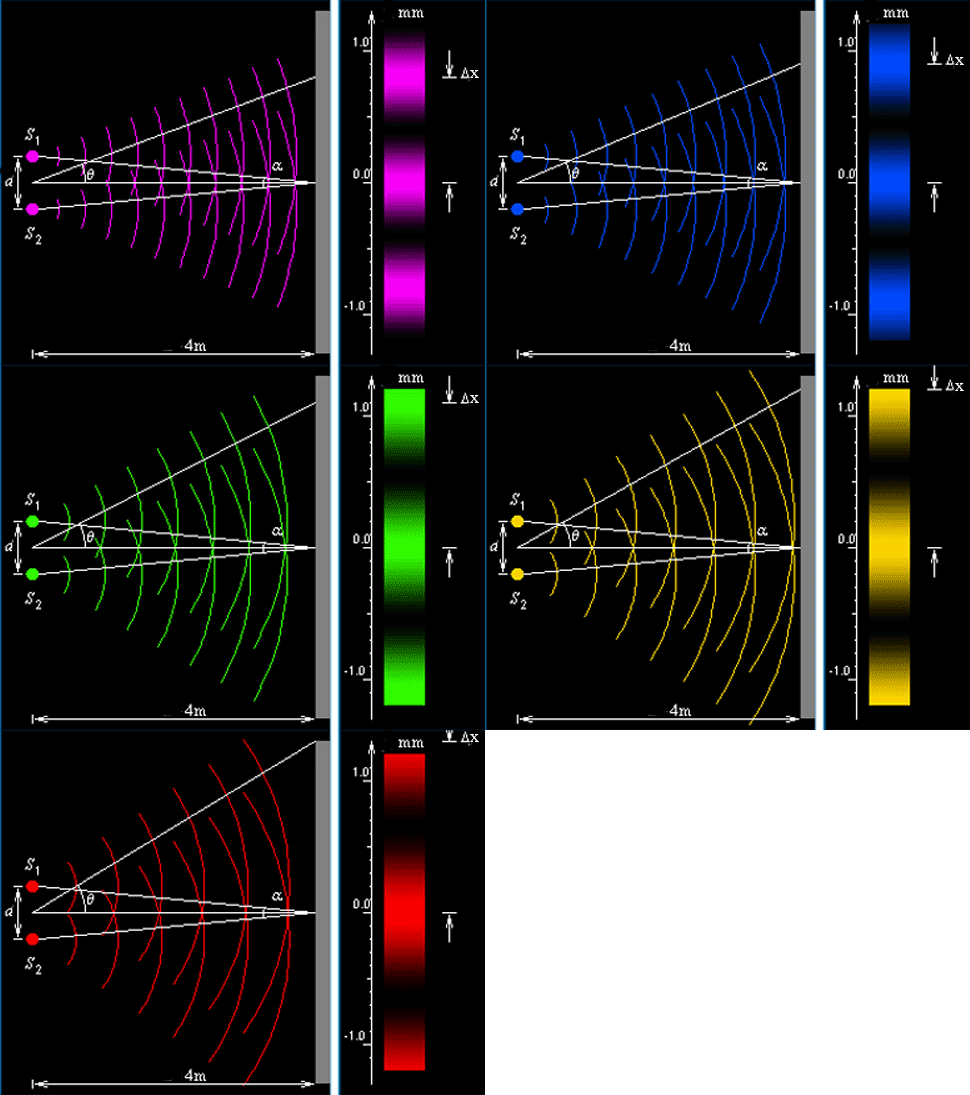
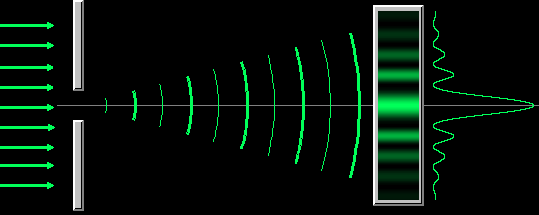
- пространственное перераспределение энергии светового излучения при наложении двух или нескольких световых волн.
Интерференция описывается как усиление или ослабление света при наложении волн. Эффект интерференции применяется в освещении, когда свет падает на очень тонкие поверхности, в результате чего определенные диапазоны частот отражаются, а другие пропускаются. Упорядочивая последовательность тонких слоев
металлических пленок в соответствии с определенной толщиной и плотностью, можно добиться избирательного отражения определенных диапазонов частот. В результате видимый свет может отражаться, а инфракрасное излучение пропускаться, например, как в случае ламп с холодным светом. Эта технология позволяет изготавливать отражатели и фильтры цветного света. Интерференционные или дихроичные фильтры обладают высоким коэффициентом пропускания и обеспечивают особенно четкое разделение отраженного
и пропускаемого диапазонов спектра
Original size 485x365
ДИФРАКЦИЯ СВЕТА
Дифракция — явление отклонения световых волн от прямолинейного распространения при прохождении света мимо края препятствия. При этом лучи могут попадать в область геометрической тени от препятствия.
Между интерференцией и дифракцией нет существенного физического различия. Оба явления заключаются в перераспределении светового потока в результате наложения (суперпозиции) волн. По историческим причинам отклонение от закона независимости световых пучков, возникающее в результате суперпозиции когерентных волн, принято называть интерференцией волн. Отклонение от закона прямолинейного распространения света, в свою очередь, принято называть дифракцией волн.
Original size 985x390
НОРМЫ ОСВЕЩЕННОСТИ
жилые помещения
общественные помещения
БИОЛОГИЧЕСКИЙ ЭФФЕКТ СВЕТА
СУМЕРЕЧНОЕ И ЦВЕТОВОЕ ЗРЕНИЕ
ЦВЕТОВАЯ ТЕМПЕРАТУРА
Original size 1057x746
Original size 1053x549
ЦВЕТОПЕРЕДАЧА, R a
ОБОБЩЕННЫЙ ПОКАЗАТЕЛЬ ДИСКОМФОРТА UGR
ОБОБЩЕННЫЙ ПОКАЗАТЕЛЬ ДИСКОМФОРТА UGR Unified Glare Rating
— характеризует степень неудобства или напряженности при наличии в поле зрения источников повышенной яркости.
РЕФЛЕКТОР, ЛИНЗА
Original size 917x399
РЕФЛЕКТОР представляет собой алюминиевый усеченный конус с граненой внутренней поверхностью. Свет, отражаясь от этих граней фокусируется в одном направлении. В зависимости от их величины и формы световой пучок на выходе получается более узким или широким. Данная технология фокусирования света существует уже очень давно — простое и дешевое в производстве изделие создает хорошее светораспределение. Особенность рефлектора — наличие паразитной засветки, когда вокруг концентрированного пучка света образуется легкий ореол.
В ЛИНЗЕ свет перераспределяется за счет преломлений в толще материала. Проектирование и производство такой оптики гораздо сложнее и дороже, однако это дает возможность точнее собрать световой поток и получить более равномерный и четкий акцент. Приборы на базе линзы используются для более сложных и деликатных светодизайнерских задач. Все фокусируемые и кадрируемые приборы основаны на базе линз.
КОЭФФИЦИЕНТ ПУЛЬСАЦИИ (%)
Коэффициент пульсаций (%) Блок питания генерирует выходной ток не постоянным сигналом, а порционно, с некоторой частотой. Светодиод, потребляя эти токовые импульсы, выдает пульсирующий световой поток. Если коэффициент пульсаций тока лежит в пределах 20%, человеческий глаз не успевает замечать разрывы между световыми вспышками, воспринимая их как непрерывный поток света. Если эта величина больше, то глаз начинает ощущать пульсацию света, что негативно сказывается на здоровье человека.
- открытые:
- закрытые;
- пыленепроницаемые пылезащитные (герметичные от пыли);
- влагозащитные; которые не пропускают влагу;
- взрывозащитные;
- взрывонепроницаемая, повышенной надежности по взрыву
Степень защиты обозначается буквами IP (Ingress Protection — защита от проникновения) и двумя цифрами.
Первая цифра показывает степень защищенности ОП от проникновения в него пыли и посторонних тел и может принимать значения от 2 до 6:
2 — специальной защиты от пыли нет; защита от твердых тел с макс. Размером от 12 мм что исключает возможность прикосновения пальцами к токоведущим элементам;
3 — защиты от пыли также нет, но исключена возможность прикосновения к токоведущим элементам твердым телом с максимальным размером в поперечном сечении более 2,5 мм (например, отверткой);
4 — защиты от пыли нет, исключена возможность прикосновения к токоведущим элемент
Вторая цифра в обозначении показывает степень защиты от проникновения воды внутрь ОП. Эта цифра может быть от 0 до 8 и означает:
0 — влагозащита не предусмотрена;
1 — предусмотрена защита от капель воды, падающих вертикально;
2 –защита от капель воды, падающих сверху под угл. не более 15° к вертикали (каплезащищенные ОП);
3 — защита от капель и брызг, падающих сверху под углом к вертикали до 60° (дождезащищенные);
4 — защита от капель и брызг, попадающих на прибор с любого направления (брызгозащищенные);
5 — защита от водяных струй, падающих с любого направления (струезащищенные);
6 — защита от проникновения воды при непостоянном попадании на ОП больших ее масс (волнозащищенные);
7 — защита от проникновения воды внутрь ОП при погружении его на определенную глубину и заданное время
(водонепроницаемые);
8 — защита от проникновения воды при погружении ОП в воду на неограниченное время (герметичные).
При степенях защиты 7 и 8 в технической документации и на самих ОП указывается предельная глубина погружения (в метрах).
ПО НАПРАВЛЕНИЮ ОСВЕЩЕНИЯ
Прямое, рассеянное, отраженное
ПО ВИДУ МОНТАЖА
подвесные, накладные, встроенные
СНОВНЫЕ ИСТОЧНИКИ СВЕТА
Original size 500x288
ОПТОВОЛОКОННЫЕ СВЕТИЛЬНИКИ
ВИДЫ ЦОКОЛЕЙ ЛАМП
СРАВНИТЕЛЬНЫЕ ХАРАКТЕРИСТИКИ РАЗНЫХ ТИПОВ ИСТОЧНИКОВ ОСВЕЩЕНИЯ
Original size 1002x707
ПРИМЕРЫ
КЛЮЧЕВЫЕ ПРОИЗВОДИТЕЛИ И ПОСТАВЩИКИ ОСВЕТИТЕЛЬНОГО ОБОРУДОВАНИЯ
РОССИЙСКИЕ ПРОИЗВОДИТЕЛИ ОСВЕЩЕНИЯ:
Original size 1056x774
ЗАРУБЕЖНЫЕ ПРОИЗВОДИТЕЛИ СВЕТИЛЬНИКОВ
Original size 1052x376
ПРОЕКТЫ СВЕТИЛЬНИКОВ — ФИНАЛИСТОВ СТУДЕНЧЕСКОГО МЕЖДУНАРОДНОГО КОНКУРСA «PENDING CULTURE»
We use cookies to improve the operation of the HSE website and to enhance its usability. More detailed information on the use of cookies can be fou...
Show more
Press space bar to start a drag.
When dragging you can use the arrow keys to move the item around and escape to cancel.
Some screen readers may require you to be in focus mode or to use your pass through key
Press space bar to start a drag.
When dragging you can use the arrow keys to move the item around and escape to cancel.
Some screen readers may require you to be in focus mode or to use your pass through key
Press space bar to start a drag.
When dragging you can use the arrow keys to move the item around and escape to cancel.
Some screen readers may require you to be in focus mode or to use your pass through key
Press space bar to start a drag.
When dragging you can use the arrow keys to move the item around and escape to cancel.
Some screen readers may require you to be in focus mode or to use your pass through key
Press space bar to start a drag.
When dragging you can use the arrow keys to move the item around and escape to cancel.
Some screen readers may require you to be in focus mode or to use your pass through key
Press space bar to start a drag.
When dragging you can use the arrow keys to move the item around and escape to cancel.
Some screen readers may require you to be in focus mode or to use your pass through key
Press space bar to start a drag.
When dragging you can use the arrow keys to move the item around and escape to cancel.
Some screen readers may require you to be in focus mode or to use your pass through key
Press space bar to start a drag.
When dragging you can use the arrow keys to move the item around and escape to cancel.
Some screen readers may require you to be in focus mode or to use your pass through key
Press space bar to start a drag.
When dragging you can use the arrow keys to move the item around and escape to cancel.
Some screen readers may require you to be in focus mode or to use your pass through key
Press space bar to start a drag.
When dragging you can use the arrow keys to move the item around and escape to cancel.
Some screen readers may require you to be in focus mode or to use your pass through key
Press space bar to start a drag.
When dragging you can use the arrow keys to move the item around and escape to cancel.
Some screen readers may require you to be in focus mode or to use your pass through key
Press space bar to start a drag.
When dragging you can use the arrow keys to move the item around and escape to cancel.
Some screen readers may require you to be in focus mode or to use your pass through key
Press space bar to start a drag.
When dragging you can use the arrow keys to move the item around and escape to cancel.
Some screen readers may require you to be in focus mode or to use your pass through key
Press space bar to start a drag.
When dragging you can use the arrow keys to move the item around and escape to cancel.
Some screen readers may require you to be in focus mode or to use your pass through key
Press space bar to start a drag.
When dragging you can use the arrow keys to move the item around and escape to cancel.
Some screen readers may require you to be in focus mode or to use your pass through key
Press space bar to start a drag.
When dragging you can use the arrow keys to move the item around and escape to cancel.
Some screen readers may require you to be in focus mode or to use your pass through key
Press space bar to start a drag.
When dragging you can use the arrow keys to move the item around and escape to cancel.
Some screen readers may require you to be in focus mode or to use your pass through key
Press space bar to start a drag.
When dragging you can use the arrow keys to move the item around and escape to cancel.
Some screen readers may require you to be in focus mode or to use your pass through key
Press space bar to start a drag.
When dragging you can use the arrow keys to move the item around and escape to cancel.
Some screen readers may require you to be in focus mode or to use your pass through key
Press space bar to start a drag.
When dragging you can use the arrow keys to move the item around and escape to cancel.
Some screen readers may require you to be in focus mode or to use your pass through key
Press space bar to start a drag.
When dragging you can use the arrow keys to move the item around and escape to cancel.
Some screen readers may require you to be in focus mode or to use your pass through key
Press space bar to start a drag.
When dragging you can use the arrow keys to move the item around and escape to cancel.
Some screen readers may require you to be in focus mode or to use your pass through key
Press space bar to start a drag.
When dragging you can use the arrow keys to move the item around and escape to cancel.
Some screen readers may require you to be in focus mode or to use your pass through key
Press space bar to start a drag.
When dragging you can use the arrow keys to move the item around and escape to cancel.
Some screen readers may require you to be in focus mode or to use your pass through key
Press space bar to start a drag.
When dragging you can use the arrow keys to move the item around and escape to cancel.
Some screen readers may require you to be in focus mode or to use your pass through key
Press space bar to start a drag.
When dragging you can use the arrow keys to move the item around and escape to cancel.
Some screen readers may require you to be in focus mode or to use your pass through key
Press space bar to start a drag.
When dragging you can use the arrow keys to move the item around and escape to cancel.
Some screen readers may require you to be in focus mode or to use your pass through key
Press space bar to start a drag.
When dragging you can use the arrow keys to move the item around and escape to cancel.
Some screen readers may require you to be in focus mode or to use your pass through key
Press space bar to start a drag.
When dragging you can use the arrow keys to move the item around and escape to cancel.
Some screen readers may require you to be in focus mode or to use your pass through key
Press space bar to start a drag.
When dragging you can use the arrow keys to move the item around and escape to cancel.
Some screen readers may require you to be in focus mode or to use your pass through key
Press space bar to start a drag.
When dragging you can use the arrow keys to move the item around and escape to cancel.
Some screen readers may require you to be in focus mode or to use your pass through key
Press space bar to start a drag.
When dragging you can use the arrow keys to move the item around and escape to cancel.
Some screen readers may require you to be in focus mode or to use your pass through key
Press space bar to start a drag.
When dragging you can use the arrow keys to move the item around and escape to cancel.
Some screen readers may require you to be in focus mode or to use your pass through key
Press space bar to start a drag.
When dragging you can use the arrow keys to move the item around and escape to cancel.
Some screen readers may require you to be in focus mode or to use your pass through key
Press space bar to start a drag.
When dragging you can use the arrow keys to move the item around and escape to cancel.
Some screen readers may require you to be in focus mode or to use your pass through key
Press space bar to start a drag.
When dragging you can use the arrow keys to move the item around and escape to cancel.
Some screen readers may require you to be in focus mode or to use your pass through key
Press space bar to start a drag.
When dragging you can use the arrow keys to move the item around and escape to cancel.
Some screen readers may require you to be in focus mode or to use your pass through key
Press space bar to start a drag.
When dragging you can use the arrow keys to move the item around and escape to cancel.
Some screen readers may require you to be in focus mode or to use your pass through key
Press space bar to start a drag.
When dragging you can use the arrow keys to move the item around and escape to cancel.
Some screen readers may require you to be in focus mode or to use your pass through key
Press space bar to start a drag.
When dragging you can use the arrow keys to move the item around and escape to cancel.
Some screen readers may require you to be in focus mode or to use your pass through key
Press space bar to start a drag.
When dragging you can use the arrow keys to move the item around and escape to cancel.
Some screen readers may require you to be in focus mode or to use your pass through key
Press space bar to start a drag.
When dragging you can use the arrow keys to move the item around and escape to cancel.
Some screen readers may require you to be in focus mode or to use your pass through key
Press space bar to start a drag.
When dragging you can use the arrow keys to move the item around and escape to cancel.
Some screen readers may require you to be in focus mode or to use your pass through key
Press space bar to start a drag.
When dragging you can use the arrow keys to move the item around and escape to cancel.
Some screen readers may require you to be in focus mode or to use your pass through key
Press space bar to start a drag.
When dragging you can use the arrow keys to move the item around and escape to cancel.
Some screen readers may require you to be in focus mode or to use your pass through key
Press space bar to start a drag.
When dragging you can use the arrow keys to move the item around and escape to cancel.
Some screen readers may require you to be in focus mode or to use your pass through key
Press space bar to start a drag.
When dragging you can use the arrow keys to move the item around and escape to cancel.
Some screen readers may require you to be in focus mode or to use your pass through key
Press space bar to start a drag.
When dragging you can use the arrow keys to move the item around and escape to cancel.
Some screen readers may require you to be in focus mode or to use your pass through key
Press space bar to start a drag.
When dragging you can use the arrow keys to move the item around and escape to cancel.
Some screen readers may require you to be in focus mode or to use your pass through key
Press space bar to start a drag.
When dragging you can use the arrow keys to move the item around and escape to cancel.
Some screen readers may require you to be in focus mode or to use your pass through key
Press space bar to start a drag.
When dragging you can use the arrow keys to move the item around and escape to cancel.
Some screen readers may require you to be in focus mode or to use your pass through key
Press space bar to start a drag.
When dragging you can use the arrow keys to move the item around and escape to cancel.
Some screen readers may require you to be in focus mode or to use your pass through key
Press space bar to start a drag.
When dragging you can use the arrow keys to move the item around and escape to cancel.
Some screen readers may require you to be in focus mode or to use your pass through key
Press space bar to start a drag.
When dragging you can use the arrow keys to move the item around and escape to cancel.
Some screen readers may require you to be in focus mode or to use your pass through key
Press space bar to start a drag.
When dragging you can use the arrow keys to move the item around and escape to cancel.
Some screen readers may require you to be in focus mode or to use your pass through key
Press space bar to start a drag.
When dragging you can use the arrow keys to move the item around and escape to cancel.
Some screen readers may require you to be in focus mode or to use your pass through key
Press space bar to start a drag.
When dragging you can use the arrow keys to move the item around and escape to cancel.
Some screen readers may require you to be in focus mode or to use your pass through key
Press space bar to start a drag.
When dragging you can use the arrow keys to move the item around and escape to cancel.
Some screen readers may require you to be in focus mode or to use your pass through key
Press space bar to start a drag.
When dragging you can use the arrow keys to move the item around and escape to cancel.
Some screen readers may require you to be in focus mode or to use your pass through key
Press space bar to start a drag.
When dragging you can use the arrow keys to move the item around and escape to cancel.
Some screen readers may require you to be in focus mode or to use your pass through key
Press space bar to start a drag.
When dragging you can use the arrow keys to move the item around and escape to cancel.
Some screen readers may require you to be in focus mode or to use your pass through key
Press space bar to start a drag.
When dragging you can use the arrow keys to move the item around and escape to cancel.
Some screen readers may require you to be in focus mode or to use your pass through key
Press space bar to start a drag.
When dragging you can use the arrow keys to move the item around and escape to cancel.
Some screen readers may require you to be in focus mode or to use your pass through key
Press space bar to start a drag.
When dragging you can use the arrow keys to move the item around and escape to cancel.
Some screen readers may require you to be in focus mode or to use your pass through key
Press space bar to start a drag.
When dragging you can use the arrow keys to move the item around and escape to cancel.
Some screen readers may require you to be in focus mode or to use your pass through key
Press space bar to start a drag.
When dragging you can use the arrow keys to move the item around and escape to cancel.
Some screen readers may require you to be in focus mode or to use your pass through key
Press space bar to start a drag.
When dragging you can use the arrow keys to move the item around and escape to cancel.
Some screen readers may require you to be in focus mode or to use your pass through key
Press space bar to start a drag.
When dragging you can use the arrow keys to move the item around and escape to cancel.
Some screen readers may require you to be in focus mode or to use your pass through key
Press space bar to start a drag.
When dragging you can use the arrow keys to move the item around and escape to cancel.
Some screen readers may require you to be in focus mode or to use your pass through key
Press space bar to start a drag.
When dragging you can use the arrow keys to move the item around and escape to cancel.
Some screen readers may require you to be in focus mode or to use your pass through key
Press space bar to start a drag.
When dragging you can use the arrow keys to move the item around and escape to cancel.
Some screen readers may require you to be in focus mode or to use your pass through key
Press space bar to start a drag.
When dragging you can use the arrow keys to move the item around and escape to cancel.
Some screen readers may require you to be in focus mode or to use your pass through key
Press space bar to start a drag.
When dragging you can use the arrow keys to move the item around and escape to cancel.
Some screen readers may require you to be in focus mode or to use your pass through key
Press space bar to start a drag.
When dragging you can use the arrow keys to move the item around and escape to cancel.
Some screen readers may require you to be in focus mode or to use your pass through key
Press space bar to start a drag.
When dragging you can use the arrow keys to move the item around and escape to cancel.
Some screen readers may require you to be in focus mode or to use your pass through key
Press space bar to start a drag.
When dragging you can use the arrow keys to move the item around and escape to cancel.
Some screen readers may require you to be in focus mode or to use your pass through key
Press space bar to start a drag.
When dragging you can use the arrow keys to move the item around and escape to cancel.
Some screen readers may require you to be in focus mode or to use your pass through key
Press space bar to start a drag.
When dragging you can use the arrow keys to move the item around and escape to cancel.
Some screen readers may require you to be in focus mode or to use your pass through key
Press space bar to start a drag.
When dragging you can use the arrow keys to move the item around and escape to cancel.
Some screen readers may require you to be in focus mode or to use your pass through key
Press space bar to start a drag.
When dragging you can use the arrow keys to move the item around and escape to cancel.
Some screen readers may require you to be in focus mode or to use your pass through key
Press space bar to start a drag.
When dragging you can use the arrow keys to move the item around and escape to cancel.
Some screen readers may require you to be in focus mode or to use your pass through key
Press space bar to start a drag.
When dragging you can use the arrow keys to move the item around and escape to cancel.
Some screen readers may require you to be in focus mode or to use your pass through key
Press space bar to start a drag.
When dragging you can use the arrow keys to move the item around and escape to cancel.
Some screen readers may require you to be in focus mode or to use your pass through key
Press space bar to start a drag.
When dragging you can use the arrow keys to move the item around and escape to cancel.
Some screen readers may require you to be in focus mode or to use your pass through key
Press space bar to start a drag.
When dragging you can use the arrow keys to move the item around and escape to cancel.
Some screen readers may require you to be in focus mode or to use your pass through key
Press space bar to start a drag.
When dragging you can use the arrow keys to move the item around and escape to cancel.
Some screen readers may require you to be in focus mode or to use your pass through key
Press space bar to start a drag.
When dragging you can use the arrow keys to move the item around and escape to cancel.
Some screen readers may require you to be in focus mode or to use your pass through key
Press space bar to start a drag.
When dragging you can use the arrow keys to move the item around and escape to cancel.
Some screen readers may require you to be in focus mode or to use your pass through key
Press space bar to start a drag.
When dragging you can use the arrow keys to move the item around and escape to cancel.
Some screen readers may require you to be in focus mode or to use your pass through key
Press space bar to start a drag.
When dragging you can use the arrow keys to move the item around and escape to cancel.
Some screen readers may require you to be in focus mode or to use your pass through key
Press space bar to start a drag.
When dragging you can use the arrow keys to move the item around and escape to cancel.
Some screen readers may require you to be in focus mode or to use your pass through key
Press space bar to start a drag.
When dragging you can use the arrow keys to move the item around and escape to cancel.
Some screen readers may require you to be in focus mode or to use your pass through key
Press space bar to start a drag.
When dragging you can use the arrow keys to move the item around and escape to cancel.
Some screen readers may require you to be in focus mode or to use your pass through key
Press space bar to start a drag.
When dragging you can use the arrow keys to move the item around and escape to cancel.
Some screen readers may require you to be in focus mode or to use your pass through key
Press space bar to start a drag.
When dragging you can use the arrow keys to move the item around and escape to cancel.
Some screen readers may require you to be in focus mode or to use your pass through key
Press space bar to start a drag.
When dragging you can use the arrow keys to move the item around and escape to cancel.
Some screen readers may require you to be in focus mode or to use your pass through key
Press space bar to start a drag.
When dragging you can use the arrow keys to move the item around and escape to cancel.
Some screen readers may require you to be in focus mode or to use your pass through key
Press space bar to start a drag.
When dragging you can use the arrow keys to move the item around and escape to cancel.
Some screen readers may require you to be in focus mode or to use your pass through key
Press space bar to start a drag.
When dragging you can use the arrow keys to move the item around and escape to cancel.
Some screen readers may require you to be in focus mode or to use your pass through key