In eight lessons, we’ll create a shot. A team handles the production in the studio. One sculpts the coral, another colors it, a third sets up the camera, a fourth animates the drone, and so on. In a standard scene, everything resides in a single .hip file in Houdini, and only one person can edit it at a time.
Therefore, the USD scene is assembled from files created by different people. Such a file is called a layer.
1. What is a layer
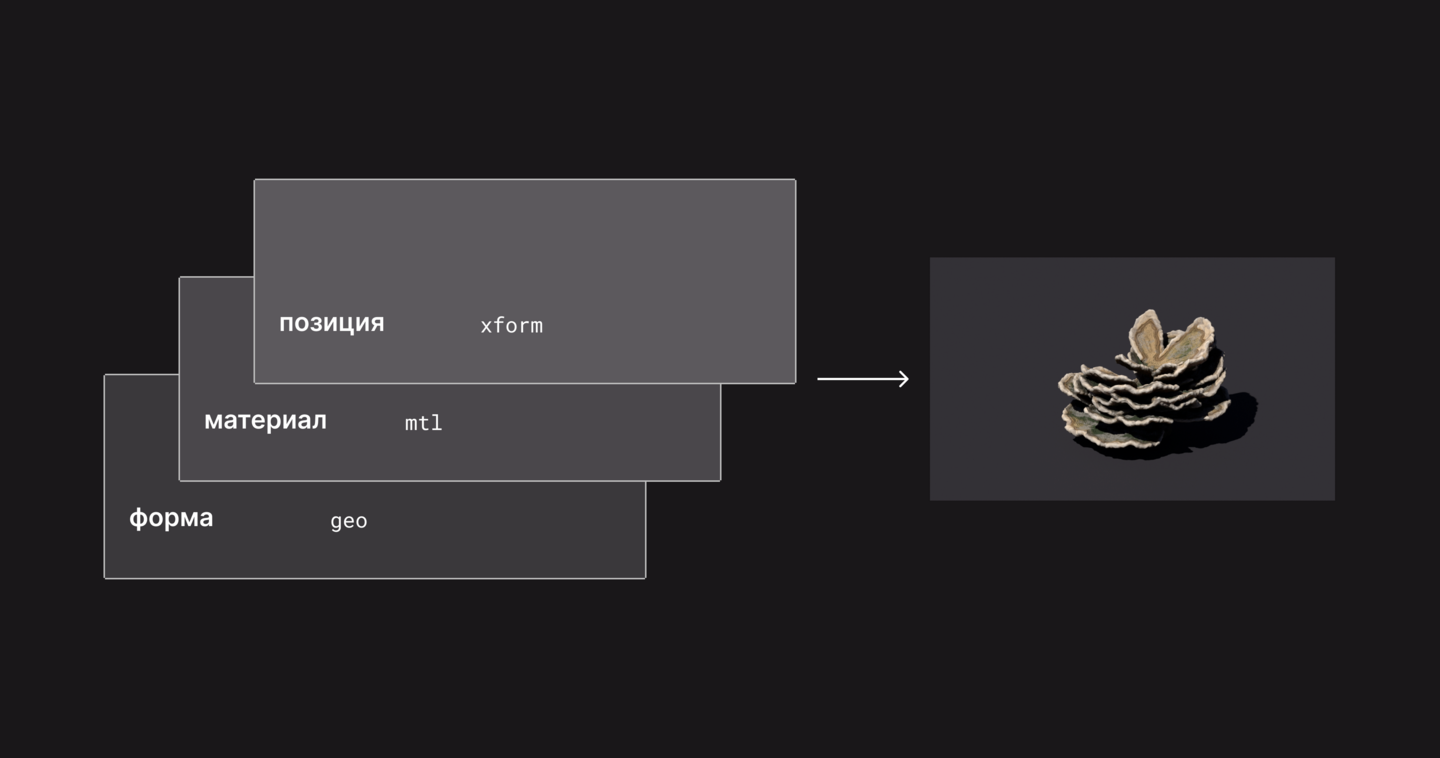
Layer (layer) is similar to a layer in Photoshop. Each has its own part of the image, and together they form a whole. In the coral diagram, there are three layers: one for shape, one for material, and one for position. However, in USD, each layer is a separate file.
A conflict only occurs when two layers write the same information—for instance, the position of a coral. The stronger layer wins; on the diagram, it is shown on top. The order of the layers determines which is stronger.
No one touches other people’s files. You place your edits on a separate layer, and it wins if your layer is stronger.
Why specifically USD? It is an open scene format from Pixar, understood by almost all 3D software and renderers. Alembic and FBX only transfer data, but USD can also assemble a scene from external files without altering anything within them.
2. Who Does What
On the left of the diagram are the departments, team roles, and lessons where we will step into those roles. The first three lessons are foundational for everyone. Modeling sculpts, lookdev colors the asset—a finished object, like a coral. Environments assemble the location from assets, and we do rigging. Layout arranges the objects and camera, animation moves things, and FX handles explosions—this results in a shot. Lighting and rendering complete the frame.
3. Where is USD in Houdini
In USD within Houdini work not in /obj, but in /stage, which is also called Solaris or LOP.
1. Node network. Each node adds or modifies what came before it in the scene.
2. Scene Graph Tree—a scene tree, much like folders on a disk.
3. Tree string—prim, a scene object with its own path. This is not a primitive from SOP, but a whole object—in this case, the coral.
4. Scene Graph Details—the values of the selected prim; attributes.
A layer can be read as text. Right-click on a node > LOP Actions > Inspect Active Layer will show the layer it is writing to. .usda files are also text files, readable by any notepad, while .usd files are usually binary.
Download the coursework to any folder. The paths in the course begin with $JOB, which is the project folder.
Next, we will assemble the asset from multiple layers and see whose opinion is stronger.